Table of contents
Overview
Most web services receive data in a request, process that data in multiple steps, and return a response that depends on the output of these steps. data-builder is a library designed to compile and execute this type of data-processing logic.
Usage
Declare data structures
The library resolves the dependencies between data builder functions by looking at the input and output types of each function. The input and output types must be structs. So we first need to declare go structs to contain the initial and built data.
Suppose our app calculates the total price of a shopping cart including discounts. The input data is a list of items in the cart, and the output data is the total price after discounts. We might declare the structs as follows:
type AppRequest struct {
    Cart []Item
}

type Item struct {
    Name  string
    PriceInCents int64
}

type GrossPrice struct {
    InCents int64
}

type PriceAdjustment struct {
    DiscountInCents int64
}

type AppResponse struct {
    PriceInDollars float64
}
In practice, computation graphs can be much more complex than this example and a large number structs may be required. Code generation is often used to manage this. For example, go generate can be used to declare structs that embed a common underlying data structure and implement a common interface. If you are not familiar with code generation in go, this guide to go generate is a good place to start.
Defining the builder function
Users can express any data-processing logic as functions that accept and return structs. In our example, we need functions to build three data structures: the gross price, price adjustments and the final response:
func BuildGrossPrice(_ context.Context, req AppRequest) (GrossPrice, error) {
    var grossPrice int64
    for _, item := range req.Cart {
        grossPrice += item.PriceInCents
    }
    return GrossPrice{InCents: grossPrice}, nil
}

func BuildPriceAdjustment(_ context.Context, grossPrice GrossPrice) (PriceAdjustment, error) {
    var discount int64
    if grossPrice.InCents > 10000 {
        discount = 1000
    }
    return PriceAdjustment{DiscountInCents: discount}, nil
}

func BuildAppResponse(_ context.Context, grossPrice GrossPrice, priceAdjustment PriceAdjustment) (AppResponse, error) {
    return AppResponse{PriceInDollars: float64(grossPrice.InCents - priceAdjustment.DiscountInCents) / 100}, nil
}
Note that the builder function signatures must satisfy the following requirements:
- The first argument is a context.Context
- All subsequent arguments are structs
- There are two return values: a struct and an error
Compiling an execution plan
Now that we have defined the builder functions, we can compile an execution plan. The library will automatically resolve the dependencies between the builder functions and determine the order of execution.
import builder "github.com/go-coldbrew/data-builder"

var (
    b builder.DataBuilder
    p builder.Plan
)

func init() {

    b = builder.New()
    err := b.AddBuilders(
        BuildGrossPrice,
        BuildPriceAdjustment,
        BuildAppResponse,
    )
    if err != nil {
        panic(err)
    }
    // When compiling the execution plan we need to tell the library that we will provide
    // it some initial data. We do that by passing empty structs since the compiler
    // just needs the type, values will come in later when we run the plan.
    p, err = b.Compile(AppRequest{})
    if err != nil {
        panic(err)
    }
}
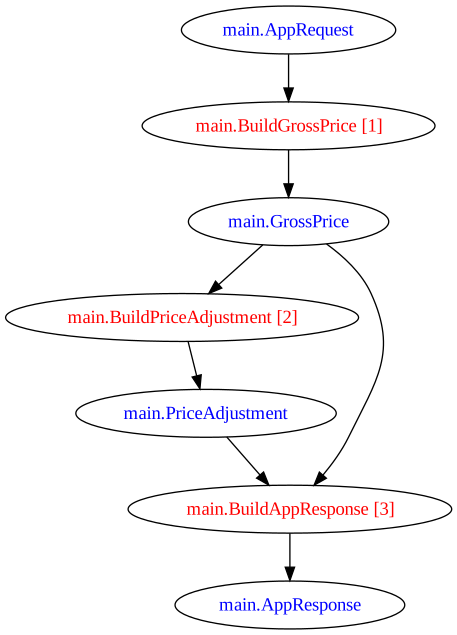
How does dependency resolution work? We defined a function called BuildPriceAdjustment. This function takes GrossPrice as an argument. This tells the library that this function depends on this object. The function also returns PriceAdjustment, which tells the library that this function needs to be executed for any other function that depends on PriceAdjustment.
During compilation we resolve all dependencies and build an execution plan. Note we have compiled the plan in our package’s init function. This means the service won’t start in case there are issues in dependency resolution. This allows us to catch these issues in testing.
After compilation we can also inspect the dependency graph visually by calling BuildGraph:
Running the execution plan and retrieving the results
Now we’re ready to run the execution plan using some actual input data:
// execute the plan
result, err := p.Run(
    context.Background(),
    AppRequest{
        Cart: []Item{
            Item{Name: "item1", PriceInCents: 1000},
            Item{Name: "item2", PriceInCents: 2000},
        },
    },
)
// read the values from the result
resp := AppResponse{}
resp = result.Get(resp).(AppResponse)
fmt.Println(resp.PriceInDollars)
Replacing builders at runtime
The Replace method allows you to swap out a builder function at runtime. This is useful for testing or when you need to change behavior without recompiling the plan.
// Define a mock builder for testing
func MockBuildPriceAdjustment(_ context.Context, grossPrice GrossPrice) (PriceAdjustment, error) {
    // Always return a fixed discount for testing
    return PriceAdjustment{DiscountInCents: 500}, nil
}

// Replace the builder with the mock
err := p.Replace(context.Background(), BuildPriceAdjustment, MockBuildPriceAdjustment)
if err != nil {
    panic(err)
}

// Run with the replaced builder
result, err := p.Run(context.Background(), AppRequest{...})
The replacement function must have the same input and output types as the original.
Running plans in parallel
For I/O-bound operations, you can run the plan with parallel execution using RunParallel:
// Run with up to 4 parallel goroutines
result, err := p.RunParallel(
    context.Background(),
    4,  // max parallelism
    AppRequest{
        Cart: []Item{
            Item{Name: "item1", PriceInCents: 1000},
            Item{Name: "item2", PriceInCents: 2000},
        },
    },
)
Parallel execution is beneficial for I/O-bound builders (network calls, database queries). For CPU-bound operations, the overhead may outweigh the benefits.
Visualizing the dependency graph
After compiling a plan, you can generate a visual representation of the execution graph using BuildGraph:
err := p.BuildGraph(context.Background(), "svg", "dependency-graph.svg")
if err != nil {
    log.Fatal(err)
}
Supported formats include svg, png, and dot (Graphviz). This is useful for:
- Verifying that dependencies are resolved as expected
- Identifying opportunities for parallelism (independent branches in the graph can run concurrently)
- Documentation and onboarding
You can also use the standalone function if you have a Plan interface:
builder.BuildGraph(myPlan, "svg", "graph.svg")
Graph generation requires Graphviz to be installed on your system (brew install graphviz or apt-get install graphviz).
Error handling
Builder function errors
When a builder function returns an error, execution stops for any functions that depend on its output. Other independent branches continue executing.
func BuildGrossPrice(_ context.Context, req AppRequest) (GrossPrice, error) {
    if len(req.Cart) == 0 {
        return GrossPrice{}, fmt.Errorf("cart is empty")
    }
    // ...
}
When running with RunParallel, if multiple builders fail, their errors are joined into a single error. You can unwrap individual errors using errors.Is or errors.As.
Compile-time validation
The Compile method catches structural errors before runtime:
- Missing dependencies: A builder requires a type that no other builder produces and wasn’t provided as input
- Circular dependencies: Builder A depends on B, and B depends on A (directly or transitively)
- Duplicate outputs: Two builders produce the same output type
Always compile plans in init() so these errors surface at startup, not at request time:
func init() {
    p, err = b.Compile(AppRequest{})
    if err != nil {
        panic(err)  // Fail fast — don't serve requests with a broken plan
    }
}
Testing data-builder plans
Unit testing individual builders
Test each builder function in isolation — they’re just regular Go functions:
func TestBuildGrossPrice(t *testing.T) {
    req := AppRequest{
        Cart: []Item{
            {Name: "item1", PriceInCents: 1000},
            {Name: "item2", PriceInCents: 2000},
        },
    }
    price, err := BuildGrossPrice(context.Background(), req)
    if err != nil {
        t.Fatal(err)
    }
    if price.InCents != 3000 {
        t.Errorf("expected 3000, got %d", price.InCents)
    }
}
Integration testing with Replace
Use Replace to swap specific builders with mocks while keeping the rest of the plan intact:
func TestPlanWithMockDiscount(t *testing.T) {
    // Compile a fresh plan for this test to avoid shared mutable state
    b := builder.New()
    err := b.AddBuilders(BuildGrossPrice, BuildPriceAdjustment, BuildAppResponse)
    if err != nil {
        t.Fatal(err)
    }
    testPlan, err := b.Compile(AppRequest{})
    if err != nil {
        t.Fatal(err)
    }

    // Replace one builder with a mock
    err = testPlan.Replace(context.Background(), BuildPriceAdjustment, func(_ context.Context, gp GrossPrice) (PriceAdjustment, error) {
        return PriceAdjustment{DiscountInCents: 500}, nil
    })
    if err != nil {
        t.Fatal(err)
    }

    result, err := testPlan.Run(context.Background(), AppRequest{
        Cart: []Item,
    })
    if err != nil {
        t.Fatal(err)
    }
    resp := result.Get(AppResponse{}).(AppResponse)
    if resp.PriceInDollars != 5.0 {
        t.Errorf("expected 5.0, got %f", resp.PriceInDollars)
    }
}
Common pitfalls
Circular dependencies
If builder A needs the output of B and B needs the output of A, Compile will return an error. Break the cycle by introducing an intermediate type or restructuring your builders.
Missing input types
If you forget to pass an initial input type to Compile, any builder that depends on it (directly or transitively) will cause a compile error. Make sure all “root” types are listed:
// Wrong: missing UserProfile that some builders depend on
p, err = b.Compile(AppRequest{})

// Right: provide all root inputs
p, err = b.Compile(AppRequest{}, UserProfile{})
Type identity matters
Two structs with identical fields but different names are different types. data-builder uses Go’s type system for dependency resolution — type Price struct{ V int } and type Cost struct{ V int } are distinct.