Table of contents
- Overview
- Adding OpenAPI annotations to your APIs
- How to access the Swagger / Open API specification
- Configuration
This page is only applicable to applications using go-coldbrew/core package and applications created by ColdBrew cookiecutter.
Overview
ColdBrew supports Swagger / Open API out of the box. ColdBrew automatically generates Swagger / Open API specification for your APIs.
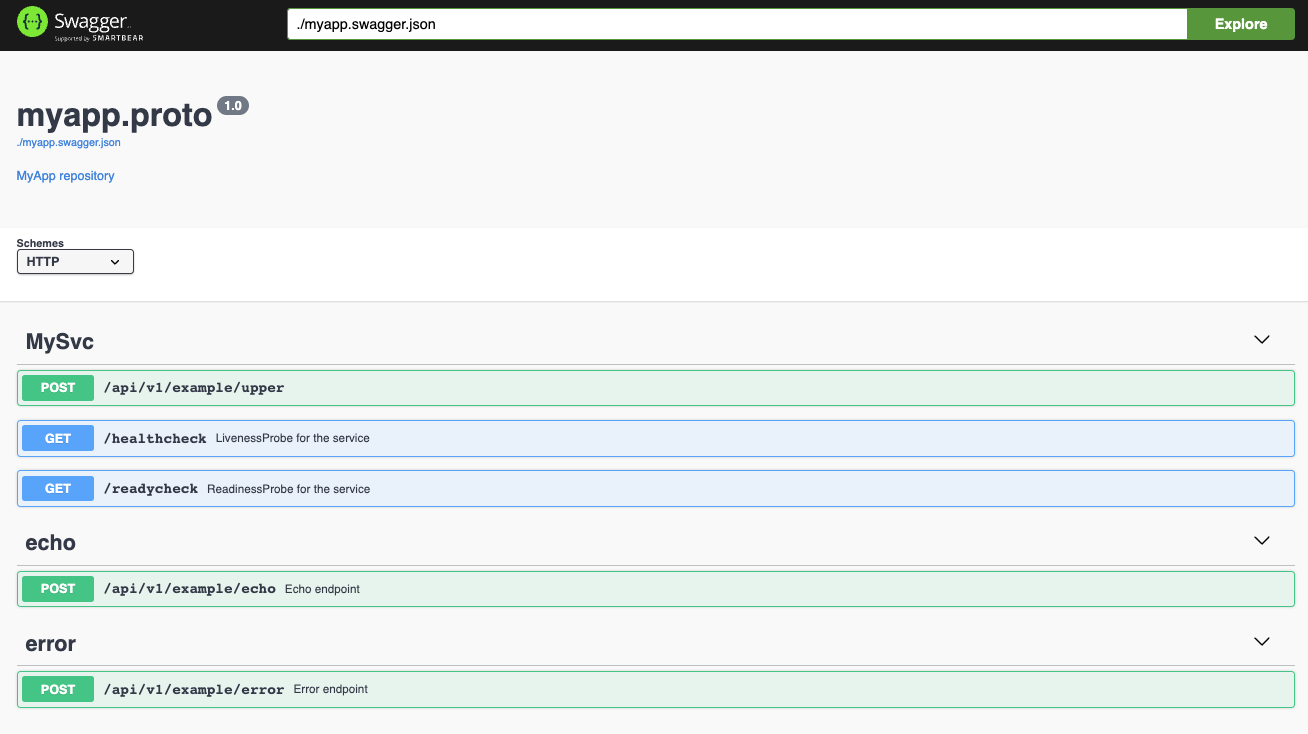
This makes it easy to use tools like Swagger UI to explore and test your APIs. ColdBrew also bundles Swagger UI and serves it at the /swagger/ URL on the ColdBrew server.
Since ColdBrew uses grpc-gateway to generate RESTful APIs, the generated Swagger / Open API specification is based on the grpc-gateway’s Open API specification documentation.
Adding OpenAPI annotations to your APIs
To learn how to add OpenAPI annotations to your APIs, please refer to grpc-gateway’s Swagger / Open API specification documentation.
How to access the Swagger / Open API specification
You can access the generated Swagger / Open API specification at the /swagger/ URL on the ColdBrew server. For example, if your ColdBrew server is running on http://localhost:9091, you can access the Swagger at http://localhost:9091/swagger/ and Open API specification http://localhost:9091/swagger/myapp.swagger.json
Configuration
Disable Swagger / Open API serving
You can disable the Swagger / Open API serving by setting the DISABLE_SWAGGER environment variables to true in the Config.
Change the Swagger / Open API serving URL
You can change the Swagger / Open API serving URL by setting the SWAGGER_URL environment variables in the Config.
Change the Swagger / Open API serving handler
You can change the Swagger / Open API serving handler by calling SetOpenAPIHandler function in your application code before calling CB.Run(). For example, if you want to serve the Swagger / Open API specification using your own custom handler, you can do the following:
import (
    "net/http"

    "github.com/go-coldbrew/core"
)

// openAPIHandler is the custom handler that serves the OpenAPI specification
func openAPIHandler(w http.ResponseWriter, r *http.Request) {
    ...
}

// main is the entry point of the service
// This is where the ColdBrew framework is initialized and the service is started
func main() {
	// Initialize the ColdBrew framework with the given configuration
	// This is a good place to customise the ColdBrew framework configuration if needed
	cb := core.New(cfg)
	// Set the OpenAPI handler that is used by the ColdBrew framework to serve the OpenAPI UI
	cb.SetOpenAPIHandler(openAPIHandler)
	// Register the service implementation with the ColdBrew framework
	err := cb.SetService(&cbSvc{})
	if err != nil {
		// If there is an error registering the service implementation, panic and exit
		panic(err)
	}

	// Start the service and wait for it to exit
	// This is a blocking call and will not return until the service exits completely
	log.Error(context.Background(), cb.Run())
}
Alternative UI implementations
SetOpenAPIHandler accepts any http.Handler, so you can swap Swagger UI for any OpenAPI-compatible UI. ColdBrew mounts it at SWAGGER_URL (default /swagger/) with http.StripPrefix, so your handler receives requests with the prefix stripped.
The cookiecutter template uses swaggest/swgui (Swagger UI v5 embedded as a Go package). Update the UI version with go get -u github.com/swaggest/swgui.
Scalar — Modern API reference UI with dark/light themes and interactive “Try It” console. Load via CDN script tag:
import (
    "net/http"
    openapi "your-module/third_party/OpenAPI" // provides SpecFS (embed.FS with *.json)
)

func scalarHandler() http.Handler {
    return http.HandlerFunc(func(w http.ResponseWriter, r *http.Request) {
        if r.URL.Path == "/spec.json" {
            http.FileServerFS(openapi.SpecFS).ServeHTTP(w, r)
            return
        }
        w.Header().Set("Content-Type", "text/html")
        w.Write([]byte(`<!DOCTYPE html>
<html><head><title>API Reference</title>
<script src="https://cdn.jsdelivr.net/npm/@scalar/api-reference@1.29"></script>
</head><body>
<div id="app"></div>
<script>Scalar.createApiReference(document.getElementById('app'),
  { url: '/swagger/spec.json', theme: 'default' })</script>
</body></html>`))
    })
}
RapiDoc — Web component that renders OpenAPI specs. Single <rapi-doc> tag:
w.Write([]byte(`<!DOCTYPE html>
<html><head>
<script src="https://cdn.jsdelivr.net/npm/rapidoc@9.3/dist/rapidoc-min.js"></script>
</head><body>
<rapi-doc spec-url="/swagger/spec.json" theme="dark"></rapi-doc>
</body></html>`))
Redocly — Three-panel reference docs (read-only, no “Try It”):
w.Write([]byte(`<!DOCTYPE html>
<html><head>
<script src="https://cdn.redoc.ly/redoc/v2.4/bundles/redoc.standalone.js"></script>
</head><body>
<div id="redoc"></div>
<script>Redoc.init('/swagger/spec.json', {}, document.getElementById('redoc'))</script>
</body></html>`))
Pin CDN script versions in production to avoid unexpected breaking changes. For self-hosting, download the scripts and serve from your own assets.